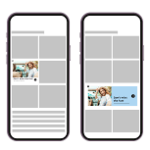
A split screen ad format, also known as a “takeover” or “half-screen” ad, is a type of digital advertisement. It appears on a user’s screen and takes up a significant portion of the display. Often, it pushes the main content to one side.
The other side shows the advertisement. This design makes the ad very noticeable. It’s meant to grab your attention right away.
Think of it like someone standing directly in front of you. They want you to notice them. Split screen ads do something similar with digital content.
They don’t just sit quietly in a corner. They actively change the layout of the page or app you are looking at. This can be jarring at first.
It feels like the ad is interrupting your experience.
The main goal is impact. Advertisers use this format because it’s hard to ignore. When you open an app or visit a website that uses this, you immediately see the ad.
There’s no way to miss it unless you close it quickly. This ensures the brand gets maximum exposure. It’s a bold move in the world of online advertising.
Why Do Advertisers Use Split Screen Ads?
Advertisers choose split screen ads for several key reasons. The most obvious one is visibility. In a crowded digital space, standing out is tough.
This format guarantees that the ad will be seen. It’s not just a small banner that can be easily overlooked. It demands attention.
Another big reason is engagement. When an ad takes up so much space, users are more likely to interact with it. They might click on it out of curiosity.
Or, they might simply spend more time looking at it. This increased engagement can lead to better results for the advertiser. It means more potential customers see their message.
These ads are also great for telling a story. Because they have more space, advertisers can show more. They can use images, videos, and text to explain their product or service.
This allows for a richer, more detailed message. It’s not just a quick tagline. It’s a more complete presentation.
Finally, split screen ads can feel premium. They are often used for big campaigns or product launches. This can make the brand seem more important or exclusive.
It’s a way for companies to make a strong statement. They want to show they are serious about reaching their audience. It’s a high-impact way to make a splash.
How Do Split Screen Ads Work on Your Device?
When you load a page or app that has a split screen ad, the system loads two things at once. It loads the content you want to see. Then, it loads the ad.
The ad is designed to take over part of the screen. It might cover the right half, the left half, or even the bottom part. The content you were viewing gets moved.
It shrinks or shifts to make room for the ad.
On mobile phones, this often means the ad takes up a large vertical section. On tablets or desktops, it might be a wide horizontal section. The technology behind it is pretty smart.
It recognizes the screen size. It then adjusts the ad layout to fit. This ensures it works across different devices.
Usually, there’s a way to close the ad. You might see a small ‘X’ button. This button can be tricky to find sometimes.
It might be in a corner of the ad. Or, it might blend in with the design. Clicking anywhere else on the ad will usually take you to the advertiser’s website.
That’s exactly what they want.
Sometimes, these ads are dynamic. This means they can change based on what you’re doing. If you’re looking at shoes, the ad might show shoes too.
This makes the ad feel more relevant to you. It’s a way for advertisers to try and connect with you personally. It’s all part of making the ad more effective.
Split Screen Ad Quick Facts
- High Visibility: Takes up a large part of the screen.
- Attention Grabbing: Hard to miss.
- Engagement Focused: Designed to encourage interaction.
- Full-Screen Impact: Creates a strong brand impression.
- Content Interruption: Pushes main content aside.
- Often Dismissible: Usually has a close button.
My Own Split Screen Ad Scare
I remember one time I was trying to find a quick recipe. I opened a popular cooking app on my phone. I just needed to see how long to bake some chicken.
As soon as the recipe page loaded, BAM! Half my screen turned into a bright, flashy ad for a new car. I couldn’t see the cooking time.
I couldn’t see the ingredients list properly.
My first reaction was pure annoyance. I felt like the app was being greedy. It wanted me to look at this car when all I cared about was dinner.
I fumbled around trying to find the tiny ‘X’ button. It was hidden in a corner, almost invisible. My thumb kept hitting the ad itself, which of course took me to the car’s website.
Ugh.
After a few tries, I finally managed to close it. The recipe page then reappeared, normal. But that feeling stuck with me.
It felt like my experience was being hijacked. It made me think twice about using that app for quick checks. While I understand advertisers need to advertise, this felt a bit too aggressive.
It made me appreciate apps that use less intrusive ads.
Common Places You’ll See Split Screen Ads
You can find split screen ads in many different places online. They are popular on mobile apps. Many news apps, social media apps, and entertainment apps use them.
When you first open the app, or when you move between sections, an ad might pop up like this. It’s a common way for free apps to make money.
Websites also use them. Especially on mobile versions of websites. When you visit a news site on your phone, you might see the article content pushed to one side.
The other side is filled with an ad. This can happen on blogs, e-commerce sites, and forums too. Any site that relies on ad revenue might use this format.
Streaming services sometimes use them, though less often. If you’re watching a video and an ad takes over half the screen, it can be very disruptive. However, this is usually a last resort for these platforms.
They often prefer different ad formats. But if they need to maximize ad revenue, it’s an option.
Think about apps you use daily. Weather apps, game apps, or even banking apps. If they offer a free version, there’s a good chance they use ads.
Split screen ads are a tool in their advertising toolkit. They use them when they want maximum impact. It’s all about trying to capture your attention effectively.
Where Split Screen Ads Appear
Mobile Apps:
- News apps
- Social media apps
- Gaming apps
- Entertainment apps
- Utility apps (weather, etc.)
Websites:
- News sites
- Blogs
- Forums
- E-commerce sites
- Any site with ad revenue model
The User Experience: Good or Bad?
For users, the experience with split screen ads is often mixed. On the good side, they can sometimes lead to discovering new products or services. If the ad is well-designed and relevant, it might be interesting.
It can also help keep apps and websites free to use. This is a big benefit for many people. We like free stuff.
However, the negative side is much more common. These ads can be very intrusive. They disrupt the flow of using an app or website.
It feels like your browsing is being interrupted. This can be frustrating, especially when you’re in a hurry. You might close the app or leave the website because of the ads.
This is a big problem for publishers.
The design of the ad itself matters. If it’s hard to close, or if it accidentally takes you somewhere else, that’s a bad user experience. Many people feel these ads are too aggressive.
They might even develop a negative association with the brand being advertised. This is the opposite of what the advertiser wants.
Ultimately, it comes down to balance. Advertisers want to be seen. Users want a smooth experience.
Split screen ads often lean too far towards the advertiser’s needs. This can sacrifice the user’s enjoyment. It’s a fine line that many advertisers struggle to get right.
We’ve all seen ads that make us want to leave.
Different Types of Split Screen Ad Layouts
Split screen ads aren’t all the same. They can have different layouts. Some fill up a large vertical section on your phone.
Others might take up a wide horizontal space on a desktop. The key is that they divide the screen into two main areas: content and ad.
One common type is the “half-and-half” split. This divides the screen perfectly down the middle. Either vertically or horizontally.
The content takes up one half. The ad takes up the other. This is very balanced in its disruption.
Another type is the “dominant split.” Here, the ad takes up a much larger portion of the screen. Maybe 70% or 80%. The content is pushed to a small side or corner.
This is even more aggressive. It emphasizes the ad even more.
Sometimes, the ad might appear as a “layer” over the content. It doesn’t technically move the content. Instead, it covers a large part of it.
You can usually still see the original content behind the ad. This is also a form of split screen, as it divides your visual attention.
The specific layout often depends on the device. Phones are usually vertical. Desktops are wider.
So, the ad will adapt. It’s all about maximizing the impact on whatever screen you are using. The goal is always to be noticed.
Split Screen Ad Layouts
Layout Style:
- Half-and-Half: Equal division of screen (vertical or horizontal).
- Dominant Split: Ad takes up the majority of the screen.
- Layered Split: Ad covers most content but content is visible behind.
- Content Shift: Main content is pushed to make room.
My Experience with a “Sticky” Split Screen Ad
I was using a travel planning website. I was comparing flights, which can be a long process. I clicked on a deal, and suddenly a split screen ad appeared.
It was promoting a travel credit card. The ad took up the right side of my screen. The flight search results were on the left.
Annoying, but okay.
What made it worse was that the ad was “sticky.” As I scrolled down the flight results, the ad stayed in place. It didn’t move up or down with the content. This meant that as I looked for cheaper flights, the ad was constantly there.
It was a visual distraction. It felt like it was always watching me.
I kept trying to close it. I’d find the ‘X’. I’d click it.
And then, a second later, it would reappear. Or a different split screen ad would take its place. It felt like a never-ending battle.
I eventually gave up on that website. I went to another one that had simpler ads. The frustration was just too much.
This taught me a lot about ad design. A good ad should be noticeable, but not a total roadblock. When an ad actively fights with the user experience, it causes problems.
It makes users leave. It makes them remember the ad negatively. For that travel website, I now remember the annoying ads more than the travel deals.
Are Split Screen Ads Effective for Brands?
The effectiveness of split screen ads is debated. For some brands, they are very effective. They can drive massive awareness.
If a brand wants to announce a new product or a big sale, this format gets the word out fast. The sheer visibility ensures many people see the message.
Studies have shown that these ads can increase brand recall. People remember seeing them. They might not like them, but they remember the brand.
This can be valuable for building brand recognition over time. Especially for new companies trying to get their name out there.
However, effectiveness can drop if the user experience is poor. If users get too frustrated, they might close the ad immediately. They might develop negative feelings towards the brand.
This can hurt sales in the long run. An ad that annoys people is not a good advertisement.
It also depends on the advertiser’s goals. If the goal is pure brand awareness, they might be great. If the goal is direct sales or website visits, they need to be carefully designed.
The call to action must be clear. And the user must be able to proceed easily.
Split Screen Ad Effectiveness Factors
- Brand Awareness: High impact for getting noticed.
- Recall: Users tend to remember seeing them.
- User Frustration: Can lead to negative brand perception.
- Conversion Rates: Depends heavily on design and goals.
- Platform Choice: More effective in certain app/website contexts.
Understanding the “Takeover” Aspect
The term “takeover” is often used with split screen ads. This means the ad “takes over” a part of the user’s screen. It seizes control of the viewing area.
This is different from a banner ad that stays in a fixed spot. A takeover ad changes the entire look and feel of the page.
This takeover can be full-screen. Or it can be a substantial portion of the screen, like in the split screen format. The idea is that the user cannot ignore it.
They have to acknowledge its presence. This is why it’s so effective for making a big impression.
Think about a physical billboard. It’s huge and in your face. A takeover ad is the digital version of that.
It’s designed to dominate the space for a short period. This ensures the advertiser’s message is the primary thing the user sees. It’s a bold advertising strategy.
Publishers often charge more for takeover ads. This is because they offer higher visibility. Advertisers are willing to pay a premium for this guaranteed attention.
It’s a win-win for the advertiser and the publisher, provided the user can tolerate it.
What This Means For You As a User
For you, the user, seeing split screen ads means a few things. First, it’s a sign that the app or website you are using likely relies on advertising. This is how they offer their service for free or at a lower cost.
It’s a trade-off: free content for ad exposure.
Second, be aware that your browsing experience might be interrupted. You might need to be patient. Sometimes, you just have to wait for the ad to finish or find the close button.
It’s part of the modern online experience.
Third, you have some control. Most of these ads have a way to be dismissed. Take a moment to find the ‘X’.
If an ad is particularly annoying or persistent, you can consider switching to a different app or website. You can also look for ad-free subscription options if they are available. Your choice matters.
Finally, understanding these ads can make them less frustrating. Knowing why they are there and how they work can take away some of the surprise. It helps you manage your expectations when you’re online.
It’s about being an informed digital citizen.
My Strategy for Dealing with Split Screen Ads
I used to get so angry at these ads. Now, I have a bit of a system. When one pops up, I take a breath.
I don’t panic. I quickly scan the ad for the close button. I know it’s usually small and in a corner.
I try my best to hit it without accidentally clicking the ad.
If it’s a video ad within the split screen, I look for the mute button or the skip button. Sometimes, these are even smaller. I’ve learned to be quite quick at this.
It’s like a mini-game to get back to my content. If the ad is truly unbearable or impossible to close, I might just close the entire app or tab. Life’s too short for that much annoyance.
I also try to remember which sites use these ads the most. If a particular app or website bombards me with them, I might look for alternatives. There are often many options for news, recipes, or social media.
I prefer platforms that respect my viewing experience more. It’s about voting with my clicks and my time.
This approach helps me stay calm. It allows me to get back to what I was doing faster. It also helps me make better choices about where I spend my online time.
It’s a small strategy, but it makes a big difference in my daily digital life.
Quick Fixes and Tips for Users
Here are some tips to help you deal with split screen ads:
- Look for the ‘X’: It’s usually in a corner. Be patient and precise.
- Tap and Hold: Sometimes holding your finger down near the ‘X’ can help you select it.
- Wait it Out: If there’s a countdown timer, just wait for it to finish.
- Refresh the Page: In some cases, refreshing might load the content without the ad, or a different ad.
- Use Ad Blockers (with caution): Browser extensions can block ads, but some sites block users with ad blockers. Be mindful of this.
- Consider Subscriptions: Many apps and websites offer ad-free versions for a fee.
- Close the App/Tab: If it’s too much, just leave. There are other options.
Tips for Managing Ads
Action:
- Find the Close Button: Always the first step.
- Be Patient: Don’t rush and click the ad by mistake.
- Use Subscription Services: For a cleaner experience.
- Explore Alternatives: If one site is too ad-heavy.
Frequently Asked Questions about Split Screen Ads
What is the main goal of a split screen ad?
The main goal is to grab the user’s attention immediately and create a strong brand impression due to the ad’s large screen presence.
Are split screen ads always bad for users?
Not always. They can help keep apps and websites free. They might also introduce you to useful products.
However, they can often be intrusive and interrupt your experience.
Can I stop split screen ads from appearing?
You can often close them using the ‘X’ button. Some browsers offer ad-blocking features, but these might not work on all apps or websites. Paid subscription services usually remove ads.
Why do some apps push my content to the side with an ad?
This is a common split screen ad format. The app shifts your content to make space for the ad, ensuring the advertisement is highly visible and cannot be easily ignored.
Are these ads more common on mobile or desktop?
Split screen ads are generally more common and impactful on mobile devices due to their vertical screen orientation. However, they are also used on desktop and tablet screens.
What should I do if I can’t find the close button on an ad?
Try looking carefully in all corners of the ad. Sometimes it’s a tiny icon or text. If it’s truly hidden or missing, your best option might be to close the app or browser tab.
Do split screen ads affect website loading speed?
Yes, they can. Ads, especially complex ones with video, require extra data and processing power. This can sometimes slow down how quickly a page or app loads and responds.
Final Thoughts on Split Screen Ads
Split screen ads are a powerful tool for advertisers. They are designed to be seen. While they can be annoying, understanding them helps.
They are a part of how many online services stay free. Remember to look for the ‘X’. And if one is too much, there’s always another app or website to try.